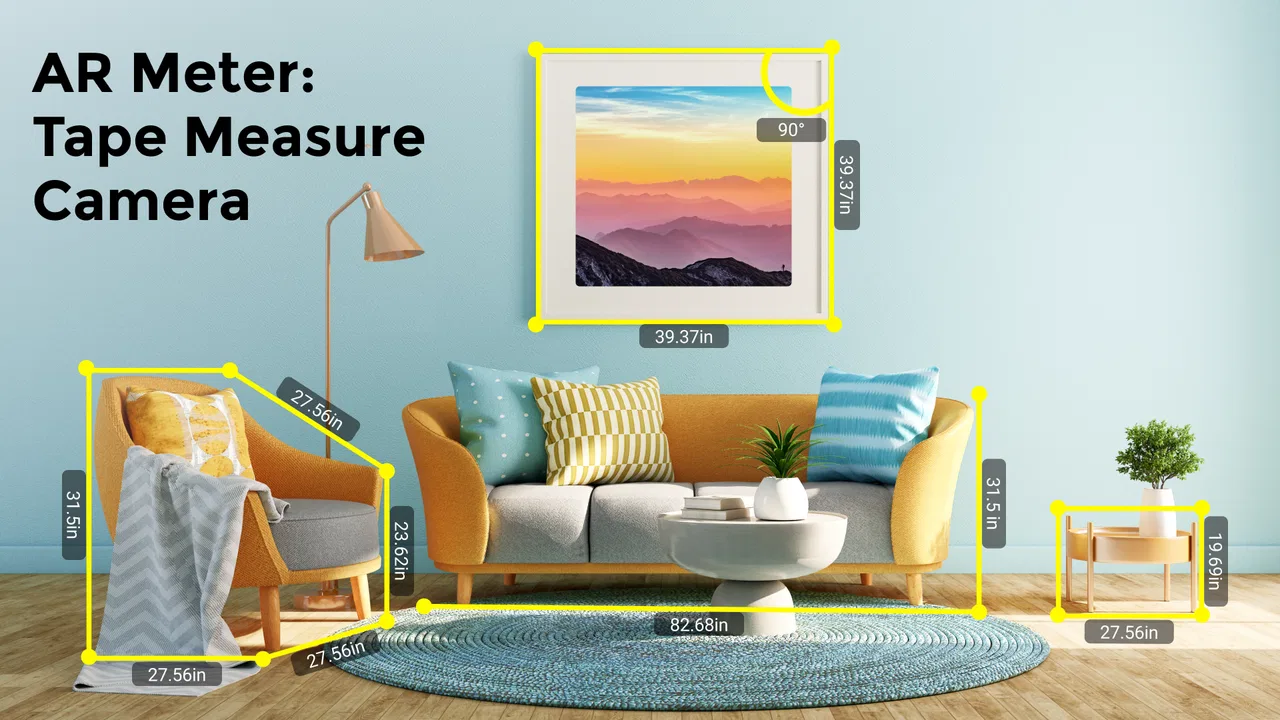
AR Meter: Tape Measure Camera
- 3.6
- Rating
- 5.00M
- Installs
- Free
- Price
 Analysis by App-foxy
I tested AR Meter: Tape Measure Camera as a quick household tool rather than treating it like a replacement for a professional measuring instrument. The idea is simple: use the phone’s camera and augmented reality to estimate the size of an object or the distance between two points. That makes it appealing when a tape measure is in another room, when several people are sharing one device, or when you need a rough answer before moving furniture.
My overall impression is practical but cautious. The app can be convenient for everyday estimates, especially when the object is visible and the phone can be moved steadily. It is less convincing when the result needs to be exact, when the surface is hard for the camera to understand, or when a household expects every person to use it in exactly the same way. The experience depends heavily on how carefully the phone is positioned, so the app is best understood as a fast visual measuring aid.
How it fits into a shared household
In a home with one commonly used phone or tablet, this kind of tool has an obvious advantage: nobody has to search for a physical tape measure before checking a doorway, shelf, table, or storage box. I can imagine one person holding the device while another moves an object into place, then switching roles for a second check. That makes it useful during small decorating jobs, furniture rearrangement, packing, and quick shopping decisions.
You May Also Like

 Blood Strike: 2.5 Anniversary
Blood Strike’s Loadouts Turn Every Drop Into a Tactical Gamble
A close look at Blood Strike’s custom loadouts: how fast access to signature weapons reshapes its battle royale rhythm, rewards preparation, and narrows the gap between fights.

 Pandora - Music & Podcasts
Pandora’s Music Is Easy to Start, but Harder to Recover
Pandora’s strength is its low-effort path from a seed to a station. Its weak spot is how much confidence it asks you to place in connection, setup, and quiet recovery.

 8 Ball Pool
 Is Built on Rivalries, Rematches, and Routine
A close look at the rivalries, rematches, shared routines, and unanswered safety questions that turn a quick pool match into a persistent mobile community.

 Samsung Music
’s Quiet Strength Is Playing What You Already Own
Its reach comes less from spectacle than from dependable access to a personal library. That simplicity is both the app’s strongest retention engine and its ceiling.

 AccuWeather: Weather Radar
AccuWeather Review: A Quick, Clear Forecast for Everyday Decisions
For everyday plans, the best forecast is the one you can understand quickly. AccuWeather makes rain timing, radar, and local conditions easy to act on, with a few trade-offs.

 Hill Climb Racing
Why Hill Climb Racing Still Turns Crashes Into One More Run
A tiny car, a bumpy hill and one more upgrade: Hill Climb Racing keeps resurfacing because its simple chaos makes every near-miss feel personal.
More From Our News Desk



A realistic example is checking whether a narrow cabinet will fit beside a refrigerator. I would open the app, frame the available space, place the measurement points as carefully as possible, and use the result as an initial guide. If the estimate is comfortably smaller than the available gap, it may be enough to continue planning. If the cabinet and the gap are nearly identical, I would still reach for a physical tape measure before buying or carrying anything heavy.
That distinction matters in a shared-device setting. One family member may be comfortable with camera-based tools, while another may assume the displayed line is automatically precise. I would explain that the app gives an estimate based on the phone’s view and positioning. A second person should repeat the measurement rather than simply accepting the first number, particularly if the result affects a purchase or installation.
The app comes from Galaxy studio apps and belongs to the tools category, which matches its focused purpose. It is free to install, with optional in-app purchases ranging from under a dollar to just under a hundred dollars per item. Because of that range, I would check the purchase screen carefully before handing the device to a child or leaving it unlocked for casual household use.
What the camera approach does well
The strongest part of the concept is speed. A physical tape measure is more dependable for exact work, but it also has to be found, extended, held level, and read correctly. With this app, I can start from the camera view and attempt a measurement immediately. For a quick question such as “Will this box fit on that shelf?” the reduced preparation is genuinely useful.
It is also easier to inspect awkward objects visually. Instead of bending down with a tape measure and trying to keep the end in place, I can view the scene through the phone and place the endpoints on the screen. The benefit is greatest for approximate lengths and distances where a small error will not cause trouble.
Another useful habit is taking the measurement from more than one angle. I would first stand squarely in front of the object, then move slightly to one side and repeat the process. If the estimates are close, I have more confidence that the reading is usable for planning. If they differ noticeably, that is a warning that the camera view, endpoint placement, or surface recognition is not stable enough for the decision.
Setup boundaries before anyone starts measuring
The app requires a compatible device running at least Android 8.1, so the first practical boundary is the hardware itself. On a shared device, I would install it and test the camera experience before promising that it will work for everyone. A phone may technically meet the operating-system requirement yet still be uncomfortable for measuring if its screen is small, its camera is poor, or the device is difficult to hold steady.
I would also establish a simple household rule: camera-based measurements are for estimates unless someone verifies them with a conventional tool. That rule prevents the most common misunderstanding. The app is not the right final authority for cutting wood, drilling into a wall, ordering a tight-fitting appliance, or checking whether a safety-related clearance is sufficient.
Lighting and surfaces deserve attention too. A plain, visible edge is easier to work with than a glossy object, a dark corner, or a cluttered background. Before measuring, I would clear away items that could obscure the endpoints and make sure the phone has a stable view. This small preparation step is more valuable than repeatedly tapping at uncertain points.
I found that a slow approach is preferable to waving the phone around. Start with the full object in view, let the camera scene settle, and then place the points deliberately. Holding the device with both hands can help, especially when the distance is long or the measurement line needs to remain aligned with a wall or floor.
There is a further boundary for shared use: do not assume that one person’s result can be compared directly with another person’s result if they use different angles or positions. If two people are coordinating a task, they should agree on what is being measured, where the endpoints are, and whether the result is only a rough estimate. Otherwise, the app can create false confidence simply because everyone sees a number on the screen.
Coordinating measurements between people
AR Meter works best when the person holding the phone and the person handling the object communicate clearly. I would describe the endpoints out loud before starting: for example, “from the front edge of the shelf to the wall,” rather than just saying “measure this.” That avoids a surprisingly common error in household projects, where one person measures the object’s outer edge and another measures its usable interior space.
For a shared-device workflow, I recommend repeating important measurements in the same order. First measure the width, then the height, then the depth, keeping the phone orientation and viewing distance as consistent as possible. This does not turn the app into a precision instrument, but it makes the results easier to compare and reduces confusion when several people are helping.
One non-obvious advantage is that the camera view can make the target easier to discuss. A person across the room can see what is being measured on the screen and point out a missed edge or obstruction. That is helpful for older relatives or anyone who cannot comfortably crouch beside furniture. The trade-off is that the phone holder must remain attentive; a conversation can easily lead to a small movement that changes the result.
If the measurement is being used while shopping, I would record the estimate together with a note about what it represents. “Approximate cabinet width at the front” is much safer than saving only a number. When another household member reviews it later, the context prevents them from treating a rough outer measurement as an exact internal clearance.
The app has attracted over five million installs and an average rating of 3.6 from around fifteen thousand ratings. I read that as a sign of broad interest rather than proof that it will suit every device or situation. Camera-based measuring is sensitive to technique, so the experience can vary considerably between a careful user and someone who expects a one-tap answer.
Age, trust, and responsible use
The content rating is Everyone, which makes sense for a neutral measuring utility. Still, an age-appropriate rating does not remove the need for supervision around purchases or household projects. A child can use the app to compare the length of toys, books, or craft materials, but I would not let a child’s measurement decide where to drill, how much material to cut, or whether furniture will fit in a hazardous location.
For younger users, the best learning opportunity is to compare the app’s estimate with a ruler or tape measure. That teaches an important lesson: tools have suitable and unsuitable jobs. The child can see that the camera is convenient for exploration while the physical tool is preferable when accuracy matters. It also turns the shared device into a collaborative activity rather than leaving the child alone with an unfamiliar measurement interface.
Trust is equally important among adults. If someone says the app measured a distance, I would still ask how the endpoints were chosen and whether the phone was held straight. This is not criticism of the developer; it is a limitation of interpreting a real scene through a handheld camera. A number can look authoritative even when the setup was inconsistent.
Because the app uses the camera as its central interaction, I would explain that clearly before another person uses the shared device. Anyone uncomfortable with camera-based tools should be allowed to skip it and use a physical tape measure instead. The app is not worth creating tension over, especially when the task can be completed just as easily with a familiar tool.
On a device used by several people, I would also keep purchase decisions with the device owner. The free entry point is convenient, but the presence of optional purchases means the person installing or managing the app should review what appears during use. That is a sensible boundary for any shared phone, particularly when children or guests may explore unfamiliar buttons.
Where it beats a tape measure, and where it does not
Compared with a normal tape measure, the app wins on availability and visual convenience. It is already on the phone, it can be used when a second person is holding an object, and it may be easier for checking a distance that is awkward to reach. It also avoids the physical tape bending, retracting, or slipping while someone tries to read it.
The tape measure wins on repeatability and confidence. Its markings are straightforward, and once both ends are positioned properly, the reading does not depend on camera interpretation. For a tight furniture fit, a renovation task, or any measurement that could waste materials, I would use the physical tool first and treat the app as a preliminary check.
Compared with a basic ruler, the app is more practical for large objects and room-scale distances, while the ruler remains better for small, flat items on a table. Compared with a laser distance tool, the app is cheaper to try and easier to share casually, but a dedicated laser device is the better choice for people who regularly measure rooms or need consistent readings during professional work.
The most useful compromise is to combine them. I would use the camera app to identify whether a project is worth pursuing, then verify the critical dimension with a tape measure or another trusted instrument. This two-stage workflow saves time without pretending that convenience and precision are the same thing.
Version, access, and day-to-day friction
The current version is 4.0.8, and the app was released on September 14, 2022. On a supported device, I would still test the basic workflow before relying on it for a planned task. The important question is not simply whether it opens, but whether the camera view feels responsive, the endpoints are easy to place, and repeated measurements remain reasonably consistent.
The free price makes experimenting low-risk, which is useful for a household deciding whether this approach suits its devices. I would not pay for optional items until I had tried the core measuring process in the exact situations I care about. A purchase cannot compensate for a phone that is uncomfortable to hold or a room where the camera struggles to distinguish the surfaces.
One source of friction is expectation management. The short label “AR Meter” sounds immediate, but a good result still requires preparation and judgment. Users who want an instant answer may become frustrated when they need to reposition the phone, clear the scene, or repeat the measurement. In my experience, that extra care is the price of using a camera-based estimate responsibly.
I would also avoid measuring while walking, climbing, or reaching over unstable furniture. The phone needs attention, and a household project is not improved by dropping the device or losing balance. Set the object down safely, stop moving, and then measure. This is a simple operational detail, but it matters more than squeezing a few seconds out of the process.
My household verdict
I recommend AR Meter: Tape Measure Camera for people who want a convenient backup measuring tool on a compatible Android device. It is particularly suitable for shared household tasks, quick furniture planning, checking packages, comparing object sizes, and helping someone who finds a physical tape measure awkward to use. The camera view can make cooperation easier when one person needs to show another exactly which edges are being considered.
I would skip it if you need certified precision, regularly measure for construction, or dislike camera-based interfaces. I would also skip relying on it for decisions where a small error creates a costly or unsafe result. In those situations, a physical tape measure, ruler, or dedicated laser tool is the better choice.
For everyone else, my advice is to treat it as a first-pass tool. Clear the area, hold the phone steadily, define the endpoints, repeat the reading from a sensible angle, and verify anything important with a conventional instrument. Used that way, the app earns its place on a shared device without asking the family to trust an estimate more than they should.
My final recommendation is simple: keep it for convenience, not precision. Its free starting point and focused design make it easy to try, while its camera-dependent results mean that careful users will get more value than people expecting a guaranteed measurement from a single tap.
For a household that understands that boundary, this is a useful little tool rather than a gimmick. It can save a search for the tape measure, improve coordination, and answer everyday questions quickly. Just make the final decision with the right instrument when the measurement truly matters.
FAQs for AR Meter: Tape Measure Camera
01What is AR Meter: Tape Measure Camera used for?
AR Meter: Tape Measure Camera is designed to estimate the size, distance, height, and dimensions of real-world objects through your phone’s camera and augmented reality. After opening the app, you can point at a surface, place virtual markers, and measure between selected points. It can be useful for quick home measurements, furniture planning, decoration, or checking approximate dimensions when a physical tape measure is not available.
02How accurate is AR Meter: Tape Measure Camera?
The app can provide helpful estimates, but its accuracy depends on several factors, including your phone’s camera, motion sensors, lighting, surface texture, and how steadily you position the device. Measurements should be treated as approximate rather than professional results. For construction, renovation, cutting materials, or other situations where precision is essential, it is safer to confirm the result with a traditional tape measure or specialized measuring equipment.
03Does AR Meter: Tape Measure Camera work on every Android or iPhone?
Not necessarily. Augmented-reality measuring tools usually require a device with a compatible camera, motion sensors, and AR support. Newer Android phones and iPhones generally offer the best experience, while older or budget devices may have limited compatibility, reduced tracking quality, or no support at all. Before downloading, check the application’s store listing for supported operating-system versions and device requirements.
04Does AR Meter: Tape Measure Camera require an internet connection?
Basic measuring functions may work without a continuous internet connection once the app and its required AR components are installed, but this can vary by device and version. An internet connection may still be needed for the initial download, updates, advertising, premium features, or certain support services. If you plan to measure in a location without reliable data, test the app offline beforehand rather than depending on it for the first time.
05Is AR Meter: Tape Measure Camera free, and are there privacy concerns?
The app may be available as a free download, but some versions can include advertisements, optional purchases, subscriptions, or locked measurement features. Because it uses the camera, you should review the permissions requested during installation and grant access only when necessary for measuring. It is also worth checking the current privacy policy and store information to understand how camera data, usage information, and any saved measurements are handled.
Pros
- Quick measurements without carrying a physical tape
- Uses the camera to measure objects in everyday environments
- Useful for checking approximate height
- length
- and distance
- Simple interface that is easy for first-time users
- Convenient for quick home projects and furniture planning
Cons
- Accuracy can vary with lighting
- angles
- and camera quality
- Requires camera access and a compatible mobile device
- Small or distant objects may be difficult to measure precisely
- Some features may be limited or interrupted by advertisements
- Not suitable as a replacement for professional measuring tools

AR Meter: Tape Measure Camera
Gallery